Recently, Qwen 35b topped the open-source model popularity chart! However, it's not the official Qwen model, but a de-censored "cracked" version. After being uncensored, this model hardly refuses to answer any questions — the content filtering wall has been removed. It can be connected to OpenClaw, serving as an uncensored adult version with unlimited tokens. It's natively multimodal and quite shocking, but I won't go into details here.
What configuration is needed?
The Q4 quantized version is about 21GB, plus context, so you need at least 24GB of VRAM. For a desktop, the only options are RTX 3090, RTX 4090, or RTX 5090. The other path is an Apple Mac with 32GB or more of unified memory.
If you already have a PC that meets the performance requirements, you can go ahead and try deploying it. If not, below are recommended new-build solutions.
Desktop Solution: RTX 5090D Graphics Card Desktop
The RTX 5090D V2 has 24GB of GDDR7 VRAM, which handles the Q4 quantized version with ease.
| Component | Recommended Model | Approx. Price |
|---|---|---|
| CPU | AMD Ryzen 7 9700X | ¥1949 |
| Motherboard | B850M | ¥1300 |
| RAM | 64GB DDR5 (32GB×2) | ¥5000 |
| GPU | RTX 5090D V2 24G | ¥19000 |
| Storage | 2TB NVMe SSD | ¥1600 |
| Power Supply | 1200W Gold Full Modular | ¥1300 |
| Case + Cooling | 360mm Liquid Cooling + Case | ¥1000 |
| Total | ~¥31149 |
Unified Memory Solution: Apple Mac with 32GB or More
The newly released MacBook Air M5 with 32GB unified memory can just fit the Q4 quantized version (~21GB). Apple's unified memory is shared between CPU and GPU, unlike PC which separates RAM and VRAM.
A note: because MoE (Mixture of Experts) only activates 3B weights for computation during inference, the actual demand on memory bandwidth is much lower than for a dense model of the same size. The experience on a Mac for this model is smoother than for a dense 27B model of equivalent quality. I haven't generally recommended Macs for running large models before, but this model is somewhat an exception.
Recommended models:
- MacBook Air M5 32GB: ~¥14499 – balances portability and performance.
- Mac mini M4 32GB: ~¥8999 (external monitor required) – also a good choice, but it's out of stock; ordering from the official website would require waiting until the end of May for delivery.
How to choose between the two solutions?
- If you are already in the Apple ecosystem or have a relatively limited budget, choose the Mac solution.
- If you want extreme inference speed, run multiple tasks simultaneously, or were already planning to build a high-end PC, choose the RTX 5090 build.
How to deploy?
Route A: Ollama (for users with some technical background)
Ollama is currently the most popular local large model management tool, supporting both Windows and Mac.
- Go to http://ollama.com to download and install.
- Open a terminal and enter the corresponding model pull command (you can find the Ollama command format on the Hugging Face model page).
- The first run will automatically download the model (about 20GB, so be patient). Once downloaded, you can start chatting right away.
For Mac users, it's recommended to look for the MLX version first, as inference speed will be faster.
Route B: LM Studio (recommended for beginners, pure GUI)
- Go to lmstudio.ai to download and install – available for both Windows and Mac.
- After opening, type this into the search bar:
HauhauCS/Qwen3.5-35B-A3B-Uncensored-HauhauCS-Aggressiveand find the Q4_K_M quantized version to download. - Load the model and use it directly in the built-in chat interface.
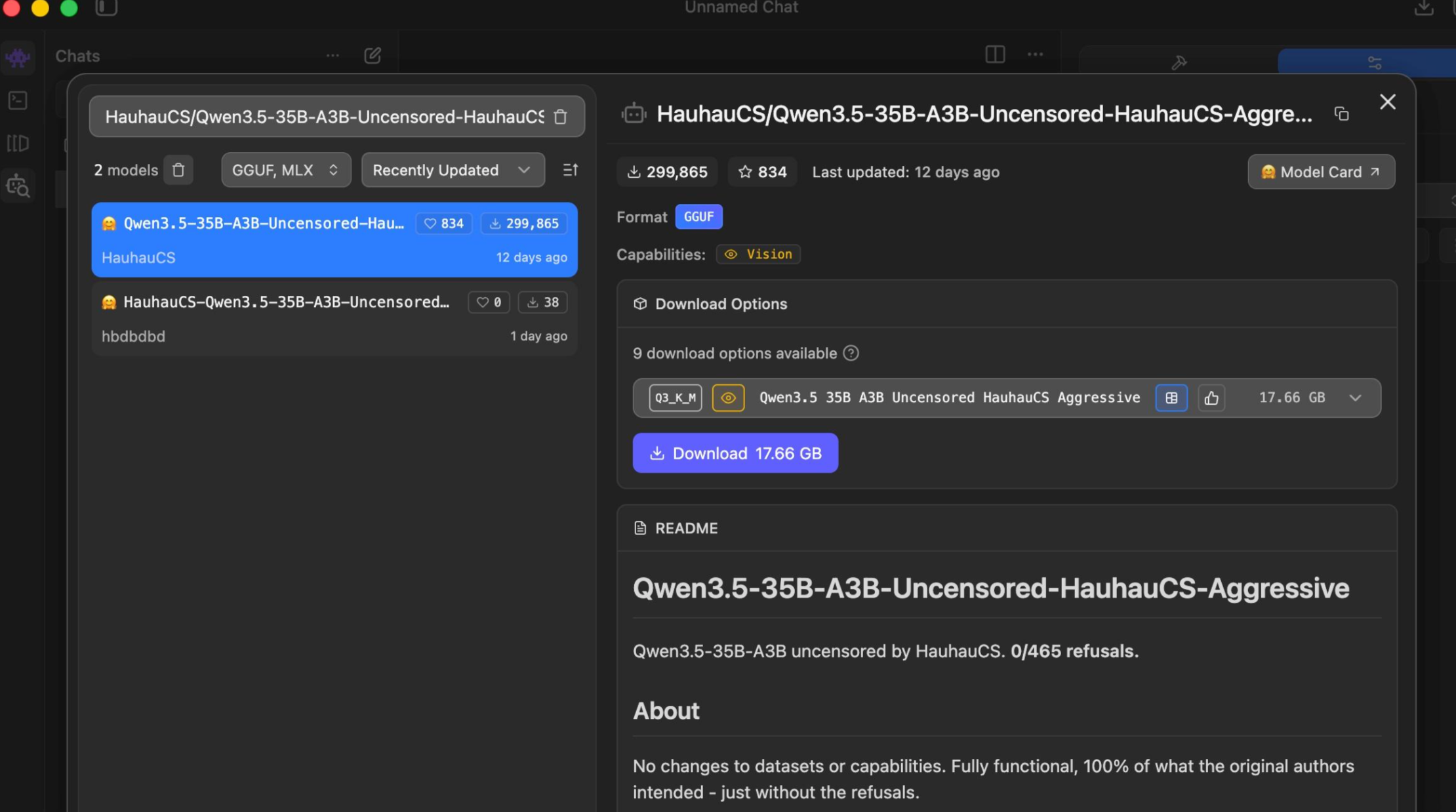
The advantage of LM Studio is that it shows real-time VRAM usage, making it easy to judge whether your current configuration can handle the model.
Cautionary notes
- The model file is about 20GB – make sure you have enough disk space before downloading.
- The first load will be slow – this is normal, just wait; it's not frozen.
If you already have a Mac with 32GB, you can try it right now.